
- The full editorEvery feature on this page, on Linux and macOS. Soon on Windows too. No tiers, no feature gates.
- Nothing leaves your machineNo cloud rendering, no telemetry. The subscription funds development, not servers holding your footage.
- Source visible on GitHubAudit what runs on your machine any time you like.
- Support from the authorQuestions land with the person who wrote the code.
Linux and macOS first, Windows soon
Tell your editor what you want. Watch it cut.
Viode is an AI-native video editor. The timeline is a plain text file, every operation is one command, and an AI with real senses reads frames, waveforms, and scopes to do the tedious work for you.
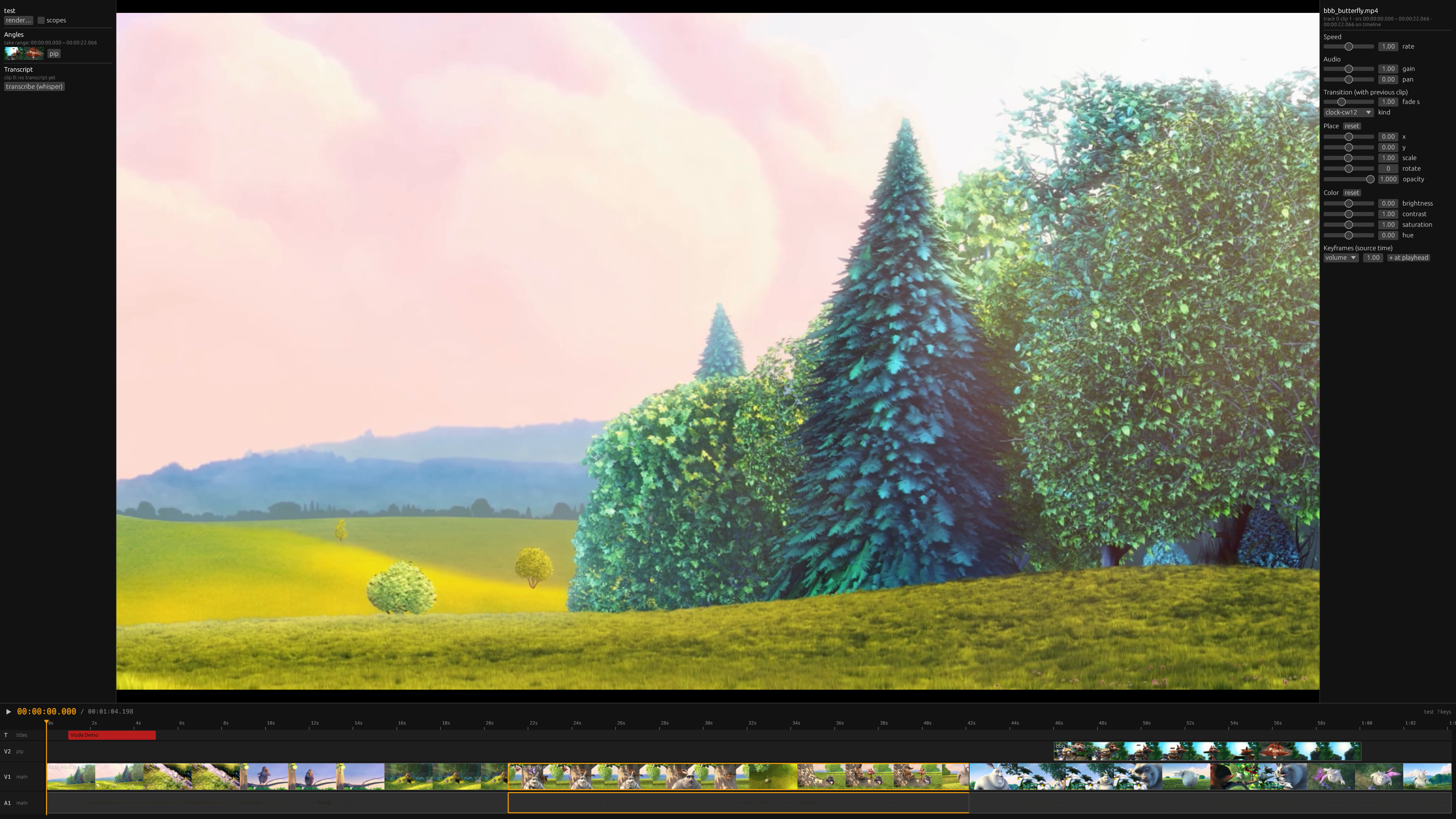
A real editor: live preview over a filmstrip timeline
The tedious work, automated
An afternoon's work, one command
The jobs that eat editing days are single verbs in Viode. Each one runs on your machine, on your footage, in seconds.
- Dead air, removed
- One command scans 92 minutes of dialogue in nine seconds and cuts every silence, keeping enough padding that speech still breathes.
- Multicam that syncs itself
- Add a second camera and Viode aligns it by its audio — no clap slate needed. Then cut on the angle wall: every angle shows its frame at the playhead, and pressing its number key takes it.
- Edit video by editing text
- Local transcription with word timing turns the footage into a transcript. Delete the sentence and the video cuts itself. No cloud, no upload.
- Exports that sound right
- YouTube, Shorts, and podcast presets finish every export with proper two-pass loudness normalization. ProRes and DNxHR cover the handoff to other suites.
- Shorts that follow the subject
- One flag turns a 16:9 edit into a vertical Short whose crop finds the speaker's face, scene by scene — and holds its framing when they look away.
- Captions, no cloud
- Local transcription becomes an SRT file or burned-in captions in one command — editable like any other title, with nothing uploaded anywhere.
- Music that knows its place
- One command ducks the music wherever someone speaks — as visible, tweakable volume keyframes. Another retimes a track to fit, hiding the seam in a crossfade.
- Shaky and noisy, fixed
- Stabilization and voice cleanup are one command each — cached one-time passes on your footage, so nothing slows the edit down afterwards.
Start to finish
A podcast episode, in six commands
- 01
viode new episode && viode add cam-a.mp4
A project is a folder and a readable text file. Footage copies in, gets probed, and lands on the timeline.
- 02
viode angle cam-b.mp4
The second camera aligns itself by its audio — on a real recording Viode found a two-second offset to the millisecond. No clap slate.
- 03
viode cut-silences 0
Ninety-two minutes of dialogue scans in nine seconds; every dead stretch is cut with enough padding that speech still breathes.
- 04
press 1, 2, 1, 2 on the angle wall
Every angle shows its frame at the playhead. Mark a range, press a number, the take is made — multicam cutting at reading speed.
- 05
viode duck 1 && viode clean 0
The music drops itself under every spoken passage as visible volume keyframes, and the voice track loses its hum and rumble in one cached pass.
- 06
viode captions --burn && viode render --preset youtube
Captions burn in from local transcription, and the master renders with proper two-pass loudness. The Short? Add --preset shorts --reframe.
AI-native, not AI-bolted-on
An editor the AI drives like you do
Claude connects to Viode as a first-class client and holds the same tools you do: it cuts, trims, places, grades, and renders — and it checks its own work by looking at the result.
- Real senses
- The AI grabs frames and reads waveforms and scopes, so its choices are judgments about pictures and sound, not guesses about timestamps.
- Your edit is a diff
- The timeline is a readable text file. Review an AI's edit the way you review a pull request, and revert it the same way.
- Every interface, equal
- The command line, the terminal UI, the desktop app, and the AI all hold the same capabilities. Nothing ships in one without the others.
For people who cut every day
The pro grammar is all here
The vocabulary you already work in — trims, keyframes, scopes, ramps — as plain verbs on a timeline you can read.
- Roll, slip, slide.
- The three trims that keep totals intact — rate-aware, and they refuse an impossible trim instead of silently guessing.
- Keyframes that survive.
- Volume, opacity, position, and scale animate in source time, so a fade or a move stays where you put it through every later trim.
- Color you can measure.
- Grade and gamma controls, .cube LUTs through ffmpeg's color math, one-command shot matching, and real waveform and vectorscope displays.
- Time as a tool.
- Constant speed, stepped ramps, frame holds, and optical-flow slow motion — a 2x clip renders at exactly half duration, and a test proves it.
- Cuts with intent.
- Crossfades, typed wipes, and a morph that smooths a jump cut into continuous motion. Titles, markers, and nested projects keep long work organized.
- Hide what must be hidden.
- Green screens key out, and a blur or pixelation can lock onto a face or a screen and follow it through the shot.
- Built for long form.
- 540p proxies drive everything interactive, edits take 3 ms on a three-hour timeline, and a render queue works through your delivery list.
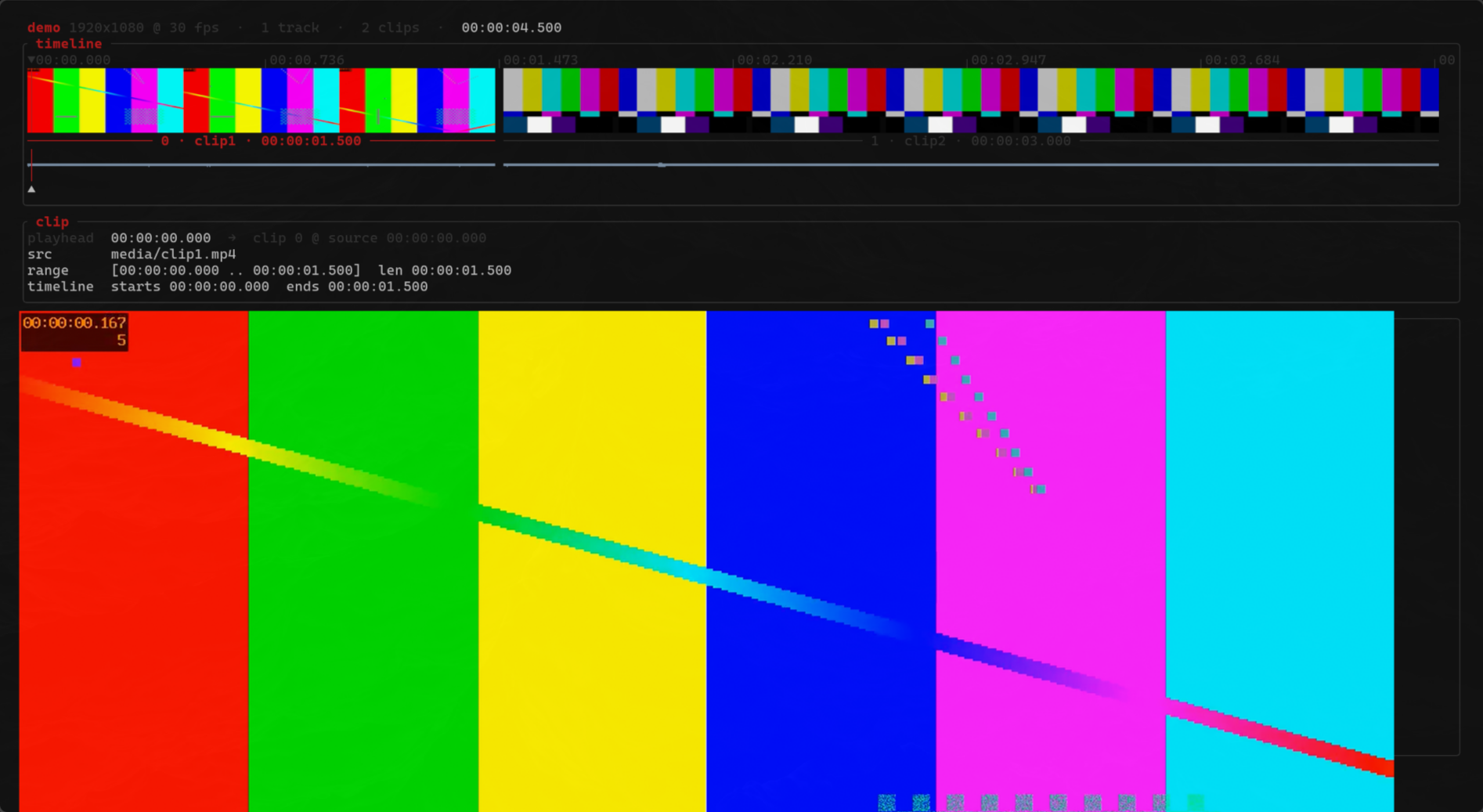
The same editor lives in your terminal
Measured on real films, not demo clips.
- 3 msper edit on a three-hour timeline
- 640×realtime silence scanning
- 20×faster scene detection in 4K
- 1.7×realtime rendering of true 4K
Pricing
One low monthly subscription
Viode is source-visible: read every line before you trust it with your footage. Try it free for 32 days, then keep it with a subscription — one price, everything included, cancel whenever you like.
Be there when it launches
Viode is being built in the open — the code is on GitHub today. Have a look, and if you want the editor when the subscription opens, drop me a line: people on the list hear first.